I was cleaning up a new directory and found the krbtgt account password hadn’t been reset for over two decades. When I tried resetting it, I could not due to complexity requirements.
Each DC in an AD domain runs a Kerberos Distribution Center (KDC) service that handles all Kerberos ticket requests. AD uses the krbtgt account for Kerberos tickets. This account is an important one and can be used in attacks, such as Golden Ticket attacks: https://techcommunity.microsoft.com/t5/security-compliance-and-identity/how-microsoft-advanced-threat-analytics-detects-golden-ticket/ba-p/250341
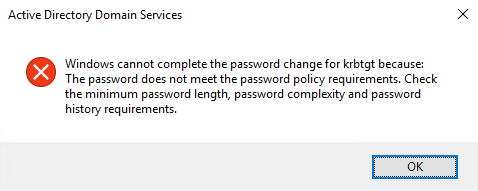
Upon trying to reset this password, I received the following error. I was using a 32-character randomly generated password that has all the complexity bits possible. Digging around, I stumbled upon this article from Microsoft: https://docs.microsoft.com/en-us/troubleshoot/windows/win32/change-krbtgt-password-may-fail
It states:
“If a custom password filter (for example, passfilt.dll) is installed on a domain controller, you may receive the following error when trying to change the password for the krbtgt account.”
“This occurs because there is special logic when changing the password for krbtgt. While the Active Directory Users and Computers (dsa.msc) snap-in allows you to enter a password, it won’t be used when changing the password. Instead, the Active Directory creates a long string of random bits to use as the password. Since this string contains random data and not Unicode characters, it fails the typical tests included in password filters. These tests typically include checking to see if the password contains a certain combination of upper and lower case letters, numbers, and punctuation.”
I checked. And sure enough, there was a password filter.
The Fix#
Found in this post on Spiceworks: https://community.spiceworks.com/topic/2258213-we-are-unable-to-reset-the-krbtgt-password-after-installed-openpasswordfilter
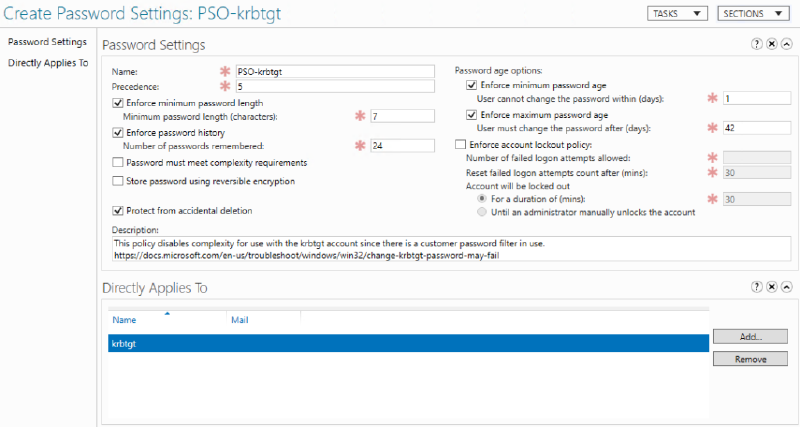
Create a new Fine-Grained Password Policy with complexity disabled, and add DOMAIN\\krbtgt as a subject of the FGPP and try again.
The Spiceworks post shows the details on Powershell, so I’ve provided the GUI version. Hope this saves somebody a headache or two.